Pages

Showing posts with label photo. Show all posts

Wednesday, 18 December 2013

Free Gif Maker


Internet memes and GIFs are some of the most fun forms of internet media. This GIF maker will allow you to easily and quickly create awesome GIF images that friends, family, and anyone else will enjoy. The best part about this GIF maker is the ease of use. The interface is made for people with little to no experience with computers or graphics of any kind. With the click of a few buttons you can have a hilarious GIF ready for sharing. 
Another important note is length in which you can create a GIF file. Rather than being limited by the number of images that you can use in order to create a GIF, you have a wide range of images that you can utilize in order to make the perfect GIF file for whatever purposes you have.


Free Gif Maker

picasion

It stands for Graphics Interchange Format and, unlike jpg it is a simple way of making an animated image. Each animation contains a number of individual images; photos, drawings, scans, text – and the result can be used as a banner on a website or in a presentation, or simply as an animated character. Easily created by using many types of image on a gif maker such as ‘Picasion’ an animation adds interest to a ‘flat’ web-page. They can be ‘looped’ so that the banner can revolve, disappear and come back – creating an attractive image to catch the eye.

Picasion

GIFMaker Online

GIFMaker.me allows you to create animated gif images online freely and easily, no registration required.
Regardless of whether you are a professional designer, photographer or simply an amateur, GIFMaker.me is designed for you, just take photos with your digital camera or mobile phone, touch up them with Adobe Photoshop, GIMP, Ribbet, Pixlr or other photo editing software, then compose them into GIF animations with GIFMaker.me!
In addition, you can play a gif backward and save it as a new one, resize an existing gif, or split a gif into separate pictures.
This gif creator works on Windows, Mac and Linux, the only thing you need is a Web browser with flash player installed.

GIFMaker

Wednesday, 11 December 2013

Screen Capture


You may take screenshots of any part of your screen with one click and save captured images in JPG, PNG, GIF, BMP and TIFF formats. It supports hotkeys (you may define your own hotkeys), autosaving history records. With 1-Click Screen Capture you may simply capture every region you see on the screen and paste it to the paint, word, excel, outlook or any other software. Just click PrintScreen button and select any region with curso

Download Screen Capture

Image Resizer


Digeus Image Resizer is the perfect tool for those who store dozens of digital pictures and images on their PC and who want to resize, compress, convert, create copies, import or organize photos.
With this resize image software, you can create e-mail friendly versions of your images, load them faster, move them easily from folder to folder; edit large numbers of image files/batch image resize and thus save space on your hard drive. Digeus Image Resizer can also change file names using a template.
Working with Digeus Image Resizer is quite simple. Launch the program. Add files for conversion. Specify conversion options and destination path for saving files and press "Convert" button. This is all you need to know to successfully use the program and get professional results.
Digeus Image Resizer can convert JPEG, JPG, JPE, JFIF, BMP, DIB, GIF, TIF, TIFF, PNG format without limiting image size and image amount. Even Huge images can be converted!
Working with huge images is now limited only by your hard drive size.
Top features:
  Unlimited number of files to be resized
  Unlimited size of files to be resized
  Unlimited quality of resized files
  Supports image formats - JPEG, JPG, JPE, JFIF, BMP, DIB, GIF, TIF, TIFF, PNG
  Convert and Rename images in batch mode
  Rename images with sequential number
  Optimized for Windows 2000 / XP / Vista
  And much more...

Download Image Resizer

Tuesday, 3 December 2013

Free 3D Photo Maker


Free 3D Photo Maker. Make 3D content yourself!
The program allows you to create 3D pictures using one source image as well as two source images.
In order to create a 3D image out of one picture, just check "Use single image" box. For creating 3D out of two images, take two shots of a still set object captured with a small horizontal shift (usually the distance must be about 2-3 inches to have the right scene).
In both cases the images are inserted into the program and next second a 3D image is created in the location which you define on your PC. Please note that in order to watch the output 3D picture it is necessary to use stereo anaglyph glasses.
Free 3D Photo Maker contains no spyware or adware. It's clearly free and absolutely safe to install and run.
DVDVideoSoft's products are freeware. In order to maintain product development and provide you with high-quality software, DVDVideoSoft may bundle links to other websites and third-party apps installations including toolbars in its products. Every time DVDVideoSoft products are installed, you have an obvious option to accept or opt-out of such installations.


Download Free 3D Photo Maker

Thursday, 11 July 2013

Free PDF editing


  • Share_list

    Share

    Publish or privately share PDF files
  • Drawing_list

    Sign or Draw

    Sign or draw anywhere on a PDF
  • Type_list

    Type

    Fill forms or type anywhere in a PDF
  • Highlight_list

    Highlight

    Highlight, comment and collaborate


Free PDF editing in your browser

Friday, 24 May 2013

BatchPhoto


BatchPhoto™ is a powerful all-in-one photo manipulation program for Windows and Mac OS X that lets photographers, web designers, business people, and families enhance photos quickly and efficiently. Simply select a group of photographs, and with a single operation annotate, touch-up, apply special effects, convert, resize, and rename every image in the group!

Download BatchPhoto


Monday, 22 April 2013

Adobe Photoshop Express


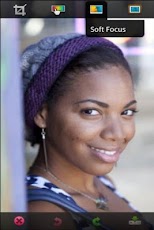
Edit and share photos virtually anywhere. Touch to crop, rotate, adjust color, and add artistic effects. Quickly share with family and friends.

Download Adobe Photoshop Express

Tuesday, 5 February 2013

Download Photoscape 3.6.3


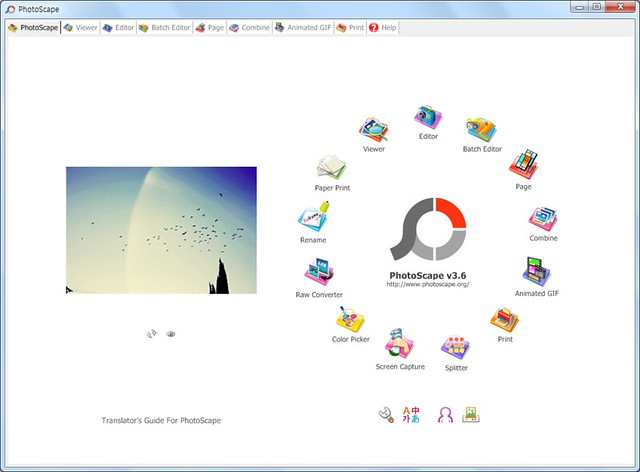
Photoscape is a fun and easy photo editing software that enables you to fix and enhance photos.


  • Viewer: View photos in your folder, create a slideshow
  • Editor: resizing, brightness and color adjustment, white balance, backlight correction, frames, balloons, mosaic mode, adding text, drawing pictures, cropping, filters, red eye removal, blooming, paint brush, clone stamp, effect brush

Thursday, 31 January 2013

Picasa Photo Viewer

When it comes to photo viewersthere are many alternatives to choose from. Picasa has always been a favorite here at Softonic, and this new version has made it our absolute top choice.

Related Posts Plugin for WordPress, Blogger...